AI assistants are getting closer to functioning at a level where their capabilities extend beyond question-answering. A sophisticated AI agent could, hypothetically, browse sites, read mail, scour file folders, fill out forms, use online services, and perform tasks for the user. There is no doubt that such assistance is handy, but there is also a security issue: do you have the right to entrust your accounts to AI?
Fear is being echoed more and more as businesses and people plug AI systems into the most confidential information. According to IBM’s 2025 Costs of a Data Breach Report, 13% of the companies involved had breaches connected to their AI models or applications, and 97% of the companies affected by those leaks lacked controls over AI access and usage. IBM also reported that in 60% of cases involving AI-related security incidents, a significant portion involved data compromise or exposure.
This does not imply that a user must mistrust AI browsers or helpers without other evidence or reason. The main issue at hand is the extent of access and the nature of the permitted use. Once an AI agent reaches the point of interacting with websites, email, cloud storage, online shopping accounts, or business programs, a small error or ill will can result in something much bigger than a simple chatbot mistake. Consequently, knowledge of the security risks of AI agents is becoming crucial to the safe use of such technologies.
What Is an AI Agent?
What makes an AI agent different from most AI systems is that agents operate not only through language but also through other means, such as tools and applications, to carry out various tasks. Traditional chatbots can’t really do much besides giving a response to an input, but a smart agent has the ability to perform a sequence of steps and take the initiative to get what the goal is.
Say, for instance, the difference between a regular AI assistant and an AI agent is that the former only offers instructions on the location of an invoice, whereas the latter would actually do the steps involved, including navigating a website to find the customer’s account to download the invoice for the customer and possibly organize it. In addition, based on its capabilities, it may even send emails, modify customer files, make orders, or connect to other services.
Agents are particularly powerful because of such capabilities. Nevertheless, they also bring in security concerns. The presence of an agent does not guarantee that a system will be secure simply because it has the same controls as its underlying component. OWASP highlights excessive agency as one of the threats that happen when an AI system is allowed too much functionality, permissions, or autonomy so that it becomes dangerous, and the system may be exploited in various ways due to manipulated or even innocent responses of the AI outputs.
What Is a Browser Agent?
A browser agent is an AI agent designed to interact with websites through a web browser. Instead of simply telling a user where to click, it can potentially navigate webpages, read content, enter information, click buttons, search websites, and complete multi-step tasks.
This can be particularly useful for repetitive activities. A user might ask an agent to compare products, find information in an online account, schedule an appointment, or organize information from several websites.
The security concern arises because the browser has access to much more than the specific webpage the user has asked the agent to visit. A browser session may already contain authenticated access to email, shopping accounts, social media, cloud services, work platforms, and other websites. As a result, browser agent risks can increase when an AI is given broad access to an existing browser environment.
Why Are AI Agents Different From Traditional Chatbots?
The following are the core reasons AI agents differ from traditional chatbots.
AI Agents Can Take Actions
The biggest difference between a conventional chatbot and an AI agent is the ability to act. A chatbot can generate text that a user may decide to follow, while an agent can potentially execute actions using connected tools.
This creates a different type of security problem. If an AI gives you incorrect information, you may simply ignore it. If an AI agent incorrectly sends an email, downloads a document, changes an account setting, or submits a form, the mistake can have a direct real-world consequence.
OWASP’s guidance on AI agent security emphasizes that excessive functionality, excessive permissions, and excessive autonomy can increase the potential impact of unexpected or manipulated model behavior.
AI Agents Can Process Untrusted Information
An AI agent may encounter information that the user never intentionally provided as an instruction. Websites, emails, documents, search results, and other external content can contain text that the AI processes as it completes a task.
This creates a particularly important distinction between trusted instructions and untrusted content. An AI agent needs to understand that information found on a webpage is not automatically an instruction from the user. When that distinction breaks down, prompt injection becomes a significant concern.
What Is Prompt Injection?
Prompt injection is a type of attack in which an attacker creates malicious instructions that manipulate an AI system into ignoring its intended task, revealing information, or taking unintended action. Unlike a traditional cyberattack that may directly exploit software, prompt injection targets the way an AI model interprets instructions and information.
The risk becomes especially important when AI systems can access websites, emails, files, applications, or other tools. A simple chatbot may produce a problematic response when prompt injection occurs. At the same time, an AI agent with real-world permissions could potentially go further by sending information, modifying data, or performing other actions.
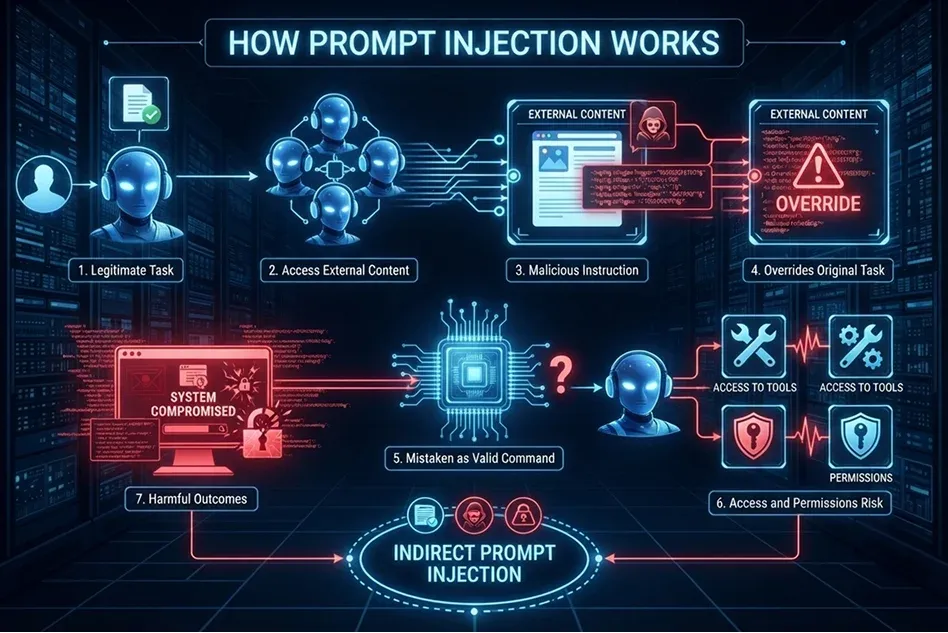
How Prompt Injection Works
- A user gives an AI system a legitimate task.
For example, the user asks an AI browser agent to search their email inbox for a specific invoice. - The AI accesses external content to complete the task.
The agent may read emails, webpages, documents, PDFs, database records, or other connected information sources. - An attacker places malicious instructions inside that content.
These instructions can be hidden in an email, webpage, document, comment, support ticket, or other content that the AI processes. - The malicious content attempts to override the original task.
It may tell the AI to ignore the user’s request, change its priorities, reveal confidential data, visit a website, download a file, or take another unauthorised action. - The AI may mistake the malicious instruction for a valid command.
If the system does not properly separate untrusted external content from trusted user instructions, it may follow the attacker’s directions instead of the user’s original request. - The risk is greater when the AI has access to tools or permissions.
A standard chatbot may only generate an incorrect or manipulated response. However, an AI agent may have access to email, browsers, files, APIs, calendars, payment systems, or internal tools, allowing it to take actions. - The attacker’s instructions can lead to harmful outcomes.
Possible consequences include exposing sensitive information, sending unauthorised messages, opening harmful websites, making unwanted changes, or misusing functions available to the AI system. - This is known as indirect prompt injection when it comes from external content.
OWASP identifies prompt injection as a major generative AI security risk. Indirect prompt injection occurs when harmful instructions are embedded in data that an AI application reads, such as webpages, emails, or documents.
Why Prompt Injection Is More Serious for Agents?
Prompt injection becomes particularly concerning when an AI system has access to tools and accounts. An attacker does not necessarily need to compromise the user’s password if they can manipulate an agent that already has legitimate access.
For example, an agent that can read email is potentially more concerning than an AI that simply summarizes text pasted into a chat. An agent that can read and send email has even greater potential impact. The more authority an agent has, the more important it becomes to separate external content from trusted instructions and require human approval for sensitive actions.
Major AI Agent Security Risks
There are major AI Agent Security risks connected with the rapid evolution of AI.
Excessive Account Permissions
One of the most important AI agent security risks is giving an agent more access than it needs. An assistant that only needs to read a calendar does not necessarily need access to email, cloud storage, financial accounts, or business administration tools.
Excessive permissions increase the potential consequences of errors, compromised integrations, or successful prompt injection. OWASP specifically recommends reducing unnecessary functionality and permissions so that an agent can access only the tools and resources required for its intended task.
For consumers, this means reviewing permissions before connecting an AI assistant to an account. For small businesses, it means avoiding broad access to company-wide systems when a narrower account or read-only permission can accomplish the same task.
Sensitive Data Exposure
AI agents may encounter sensitive information while performing ordinary tasks. An agent connected to email could see private correspondence. An agent connected to cloud storage could encounter financial documents, customer records, contracts, or internal company files.
The risk is not limited to an attacker directly stealing the information. Sensitive information could also be exposed because an agent was manipulated into sending, copying, uploading, or revealing data.
IBM’s 2025 research found that 60% of reported AI-related security incidents resulted in data compromise, underscoring the importance of access and data controls when AI systems interact with sensitive information.
Account Takeover Through an AI Agent
An AI browser agent may operate within an authenticated browser session. That means it could interact with an account without requiring the user to enter credentials repeatedly. This creates a different type of account security problem. Instead of trying to steal a password directly, an attacker may attempt to manipulate the AI system that already has access to the account.
This is particularly important for accounts containing valuable information or financial capabilities. Users should therefore be cautious about granting an AI agent unrestricted access to sensitive accounts.
Unintended Purchases and Transactions
AI agents can make online tasks more convenient, but financial actions require additional caution. Searching for a product is very different from purchasing it, just as finding a bill is different from paying it.
An agent with permission to complete transactions could potentially make a purchase based on a misunderstanding, incorrect information, or manipulated webpage content. A safer setup is to allow the agent to prepare a transaction while requiring the user to review and approve the final action. The same principle applies to reservations, subscription changes, financial transfers, and other actions that are difficult to reverse.

Malicious Websites and Browser Content
Browser agents must process webpage content to complete tasks, creating another potential attack surface. A malicious webpage can contain content specifically designed to influence an AI system. A human may recognize that a strange instruction on a webpage is irrelevant to the task. An AI agent may interpret the same content differently, particularly if its instructions and external data are not clearly separated.
This is one reason AI browser security requires more than conventional browser protections. Users need to consider not only whether a website is safe for humans to visit but also whether the content could manipulate an AI system operating on their behalf.
Malicious Files and Downloads
AI agents may also encounter documents and downloadable files during browsing. A user might ask an agent to locate a report, download an invoice, or retrieve a document from a website.
Automatically opening or executing downloaded files creates additional risk. A malicious file could contain harmful content even if the website itself appears legitimate. For sensitive workflows, it is safer to separate the actions of finding and downloading a file from opening, executing, or installing it.
AI Assistant Privacy: What Information Can an Agent See?
An AI Agent can view the following:
Your Email and Messages
An AI assistant connected to email may have access to messages that contain names, addresses, business information, attachments, invoices, personal conversations, and other sensitive details.
Before granting access, users should determine whether the AI needs the ability to read all messages or only a specific category of information. Where possible, access should be limited to the smallest practical scope.
Your Cloud Files
Cloud storage can contain years of personal and professional information. Giving an AI agent access to an entire drive may expose far more information than the agent needs for a particular task.
For example, an AI that needs to summarize a single project folder does not necessarily require access to tax documents, personal photographs, contracts, or unrelated business records.
Your Business Accounts
Small businesses should be especially careful because a single employee account can provide access to multiple systems. Email, CRM platforms, cloud storage, customer databases, social media accounts, and financial applications may all be connected.
Giving an AI agent unrestricted access to such an environment can increase the potential impact of a compromised or manipulated agent.
Does a VPN Protect Against AI Agent Security Risks?
A VPN addresses a different part of the security picture. It can help protect network traffic when you connect through potentially untrusted networks, such as public Wi-Fi in hotels, airports, cafés, or coworking spaces.
However, a VPN does not prevent prompt injection, excessive permissions, malicious webpage instructions, or an AI agent from making an incorrect decision.
For users who access AI tools and sensitive accounts while traveling or using public networks, a VPN can therefore be considered one layer of broader security. It should be combined with measures such as MFA, secure devices, software updates, and carefully controlled AI permissions. The key distinction is simple: a VPN helps protect the connection, while AI security controls help protect what the agent can access and what it can do.
How to Safely Give AI Access to Your Accounts?
The following are ways to grant AI access to your accounts safely.
Start With Low-Risk Tasks
If you are testing an AI browser agent for the first time, begin with tasks that do not involve financial transactions, sensitive documents, or administrative privileges. For example, you could use it to find public information or organize non-sensitive content before allowing it to interact with private accounts.
Limit Its Permissions
Choose the narrowest permissions available. Read-only access is preferable when editing or sending information is unnecessary. The objective is to ensure that the agent has sufficient authority to complete its task but not enough to cause unnecessary damage if something goes wrong.
Keep Humans in the Loop
AI agents can automate many tasks, but automation does not mean every action should happen without review. For purchases, account changes, financial activity, sensitive communications, and deletion of important information, human confirmation provides an additional layer of protection.
Monitor What the Agent Does
Pay attention to the actions an AI agent takes rather than focusing only on whether it eventually completes the requested task. If an agent starts opening unexpected websites, accessing unrelated files, requesting unnecessary permissions, or attempting actions outside the original task, stop the process and investigate.
The Future of Agentic AI Threats
Agentic AI is likely to become increasingly integrated into browsers, operating systems, business applications, and personal productivity tools. As agents gain more ability to plan and execute tasks, security will increasingly depend on how their permissions, tools, memory, and external data are controlled. OWASP’s work on agentic AI highlights threats such as prompt injection, excessive agency, tool misuse, data exposure, and attacks targeting interconnected agents.
This means the security model for AI assistants is changing. The question is no longer simply whether an AI can generate an incorrect answer. It is also whether an AI can be manipulated into taking an incorrect action. For consumers and small businesses, the practical response is to limit access, restrict permissions, review important actions, and avoid giving an AI more authority than the task requires.
Conclusion
AI agents and browser agents can make online tasks faster and more convenient. Still, their ability to act on a user’s behalf creates security risks that traditional chatbots do not face to the same degree. Prompt injection, excessive permissions, sensitive data exposure, account misuse, malicious webpage content, and unintended transactions are among the issues users should consider before giving AI access to their accounts.
The most important principle is simple: do not give an AI agent more access or authority than it needs. Limit permissions, protect sensitive accounts, use strong authentication, review important actions, and maintain human oversight when an action could have significant consequences.
AI assistants can be useful tools without becoming unrestricted digital operators. The more control users maintain over what an agent can see and do, the easier it is to benefit from automation while reducing unnecessary exposure to emerging agentic AI threats.
FAQs
Here are some of the most frequently asked questions.
What are the biggest AI agent security risks?
Major risks include prompt injection, excessive permissions, sensitive data exposure, unauthorized actions, malicious webpages, account misuse, and mistakes made by an AI agent. The impact depends heavily on what accounts, tools, and systems the agent can access.
Can a browser agent access my passwords?
A browser agent’s access depends on how it is designed and what permissions it receives. If it operates within an authenticated browser environment, it may be able to interact with websites where you are already signed in. Users should therefore understand the agent’s permissions before giving it access to sensitive accounts.
How does prompt injection affect AI browser security?
Prompt injection attempts to manipulate an AI’s behavior through specially crafted instructions. With a browser agent, malicious instructions can potentially be placed in webpages, emails, documents, or other content the agent encounters. If the agent has significant permissions, successful manipulation can lead to unintended actions or the exposure of information.
Should I let an AI agent use my personal or business accounts?
Access should depend on the specific task and the permissions required. If an AI does not need access to an account, do not connect it. When access is necessary, use the narrowest permissions available, prefer read-only access when possible, and require human confirmation for sensitive actions.
Table of Contents