Unlike generic phishing attempts that are easy to spot, clone phishing uses legitimate messages that victims trust, making it one of the most dangerous social engineering tactics. According to cybersecurity reports, over 94% of malware is delivered via email, and clone phishing attacks alone have increased by more than 35% year-over-year due to the availability of advanced spoofing tools and leaked email credentials.
This blog explains what clone phishing is, how cloning attacks work, provides real-world examples, and outlines steps users and organizations can take to protect themselves.
What Is Clone Phishing?
Clone phishing is a type of cyberattack in which hackers duplicate a legitimate email that the victim has previously received. They use the same layout, sender name, branding, and attachments, but replace links or files with malicious versions. The attacker’s goal is to trick the user into believing the message is genuine, leading them to click on a harmful link, download malware, or enter their login credentials.
Cloning Attack: How It Works?
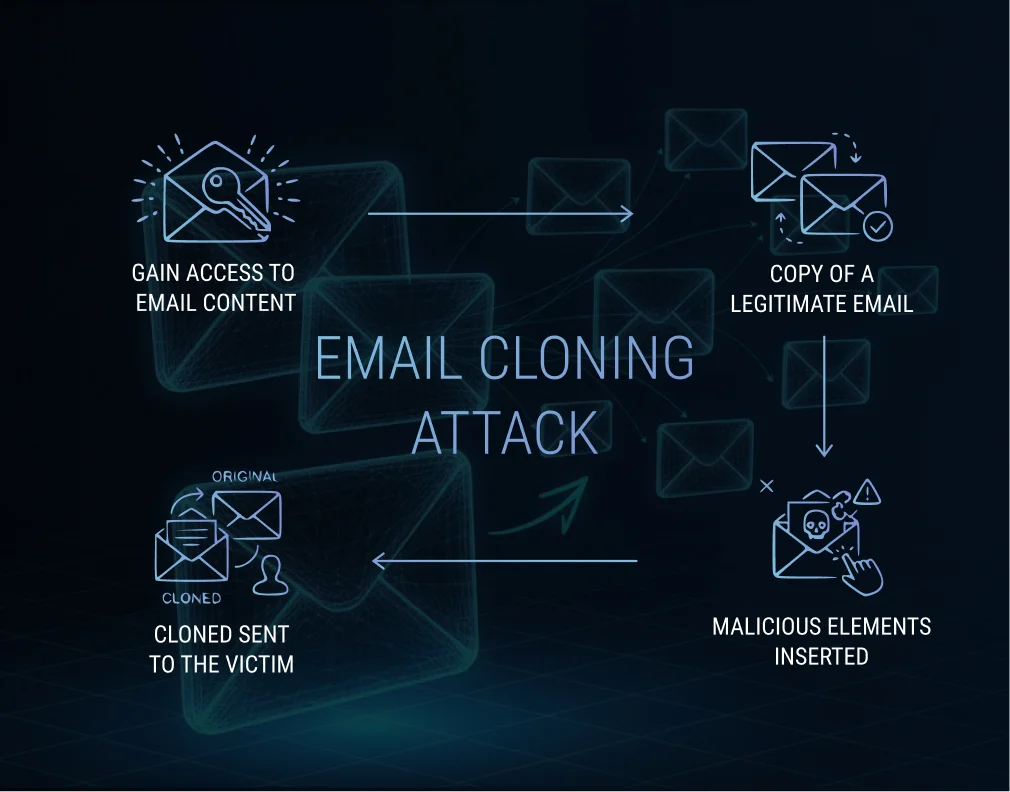
A cloning attack typically follows a predictable sequence:
1. Attackers gain access to email content
This can happen through:
- Previously compromised accounts
- Leaks or breaches
- Intercepted email communications
- Publicly available email templates
2. The legitimate email is copied
Every element is duplicated including:
- Subject line
- Sender name
- Email signature
- Branding, images, and layout
3. Malicious elements are inserted
Hackers modify the email by replacing:
- URLs with phishing links
- Attachments with malware
- “Reply-to” fields with their own address
4. The cloned email is sent to the victim
It often includes a message like:
“Resending the previous email with updated documents.”
This gives the attack credibility and encourages users to open the message without suspicion.
Key Stats on Clone Phishing
- According to a 2025 report, approximately 3.4 billion phishing emails are sent every day worldwide.
- In 2024, security vendor data show that nearly 900 million phishing attempts were blocked globally, a 26% increase from the previous year.
- According to one dataset, roughly 47% of all email traffic in corporate mailboxes worldwide is spam or unwanted, including phishing and malicious content.
- Business Email Compromise (BEC) attacks, a category that often employs clone-phishing tactics, accounted for approximately 10.6% of social-engineering email attacks in 2025.
Cloning in Cybersecurity
In cybersecurity, “cloning” refers to the replication of legitimate digital assets such as emails, websites, login pages, or applications to deceive users into interacting with malicious copies. These attacks are hazardous because they exploit familiarity and trust, making them more challenging to detect than traditional phishing scams. Clone phishing is a prime example, but similar cloning methods include:
- Website cloning to harvest passwords.
- App cloning to distribute malware
- Credential cloning in identity theft
Clone Phishing Examples
The following are some examples of clone phishing.
1. Fake Invoice Attachment
A company receives a legitimate invoice from a vendor. An attacker clones this email, swaps the PDF for a malware file, and sends it back as “updated billing”.
2. Password Reset Requests
Hackers clone an authentic password reset email from platforms like Microsoft 365 or Google. Victims click the cloned link and unknowingly enter credentials into a fake login page.
3. “Resent Email” Trick
A common tactic is a cloned email that states:
“Resending due to attachment issue.”
Victims assume it’s routine and open the malicious file.
4. Meeting Invitation Phish
Cybercriminals often clone legitimate meeting invitations from platforms such as Zoom, Microsoft Teams, or Google Meet to trick users into clicking on malicious links. Because employees frequently receive meeting reminders and calendar updates, attackers exploit this familiarity.
Clone Phishing Attack: Why It’s Dangerous?
Clone phishing is considered one of the most dangerous forms of phishing because it weaponizes trust, familiarity, and credibility, three factors that make victims far more likely to engage with malicious content. Unlike generic phishing attempts filled with errors or suspicious language, clone phishing uses legitimate emails as templates, making it incredibly hard to detect.
Below are the key reasons clone phishing is so dangerous:
1. It looks 100% Legitimate
The email is cloned from a real message the victim has previously received or interacted with.
This means the cloned email includes:
- The exact layout and branding
- The same subject line
- The sender’s real name or spoofed address
- Previous attachments
2. Uses Trust and Familiarity to Bypass Suspicion
Humans trust patterns. When we see an email that resembles one we saw last week from the same coworker, vendor, or service provider, we subconsciously feel a sense of safety.
Attackers use statements like:
- “Here’s the updated file.”
- “Resending due to earlier error.”
- “Please check the revised attachment.”
3. Exploits Existing Conversations and Workflows
Since the cloned email seamlessly integrates into an existing workflow, employees are conditioned to respond quickly without questioning its authenticity. Attackers often target:
- Ongoing business email threads
- Active projects
- Vendor–client communications
- Internal team messages
4. Difficult for Security Tools to Detect
Even advanced email filters struggle to flag cloned emails when they perfectly mimic a company’s real communication patterns. Clone phishing emails commonly bypass standard security measures because:
- They closely resemble legitimate emails
- Spoofed domains can pass basic checks without DMARC enforcement.
- Malicious links or attachments are embedded inside a trusted format.
5. High Success Rates in Business Email Compromise (BEC)
Clone phishing is often used as part of BEC attacks, which cost organizations over $3 billion annually, according to global cybersecurity assessments. Because the email appears authentic, attackers can:
- Trick employees into wiring money
- Request confidential data
- Redirect payroll deposits
- Steal login credentials for internal systems
6. Can Lead to Full-System Compromise
Once a victim clicks a malicious link or downloads a cloned attachment, attackers may install:
- Ransomware
- Credential stealers
- Remote access trojans (RATs)
- Keyloggers
This allows them to escalate privileges, move laterally across the network, and potentially take over critical systems.
7. Difficult for Victims to Realize They Were Targeted
Because the cloned email looks legitimate, many victims:
- Don’t notice anything unusual
- Don’t report the incident.
- Realize the attack only after damage is done
How Do Hackers Clone Email Addresses?
Hackers clone or spoof email addresses through several techniques:
1. Email Spoofing
Attackers forge the “From” address using:
- Open-source email spoofing tools
- Misconfigured email servers
- Lack of SPF, DKIM, or DMARC protection
2. Compromised Accounts
If a user’s account is breached, attackers can:
- Send emails directly from the real account
- Access old messages to clone
- Steal contacts and conversations.
3. Domain Imitation (Typosquatting)
Hackers register similar domains, such as:
- amazon.com
- microsoftsupport.com
This makes cloned messages appear authentic.
4. Data Breaches
Data breaches are one of the most common ways cybercriminals gain access to the information they need to clone or impersonate email addresses. When a breach occurs, massive amounts of sensitive data, such as emails, login credentials, internal communication logs, and even full mailbox backup,s can end up being sold or leaked on underground forums.
Conclusion
Clone phishing is one of the most deceptive and effective cyberattacks today, as it mimics the emails that people trust the most. As hackers continue refining cloning and spoofing techniques, individuals and businesses must prioritize cybersecurity awareness and verification practices. By understanding how clone phishing works and adopting strong email authentication and training, you can significantly reduce the risk of falling victim to these increasingly common attacks.
FAQs
Here are some of the frequently asked questions.
1. Why is clone phishing so effective?
Because it uses real emails as templates, clone phishing exploits familiarity and trust. Victims believe the message is legitimate since they’ve seen it before. Additionally, attackers often insert urgency, making people click without verifying.
2. How to prevent clone phishing attacks?
Organizations and individuals can protect themselves by:
Enabling SPF, DKIM, and DMARC to stop email spoofing
Using multi-factor authentication (MFA)
Training employees on phishing awareness
Verifying suspicious “resent” emails directly with the sender.
Using email security tools that detect cloned content
Avoid opening attachments from unexpected follow-ups.
3. What are the differences between clone phishing and spear phishing?
Clone Phishing
Spear Phishing
Uses a copied version of a real email
Tailored message written from scratch
Appears as a “resend” or copy
Appears personalized to the individual
Focuses on familiarity
Focuses on personal information
Often part of BEC scams
Often part of targeted attacks on executives
4. What can happen if I interact with a cloned email?
You may experience:
Account compromise
Malware infection
Data theft
Financial fraud
Unauthorized access to corporate systems
Identity theft
Table of Contents