Since employees use a variety of devices and locations to access corporate resources, perimeter-based security that relies on a fixed boundary is no longer enough. Cybercriminals take advantage of this change by spreading malware, phishing attacks, ransomware, and malicious websites during the normal course of web browsing. The global Secure Web Gateway (SWG) market is projected to reach approximately USD 19.5 billion in 2026, up from USD 14.8 billion in 2024, reflecting the growing demand for web security solutions driven by cloud adoption, hybrid work, and increasing cyber threats.
A Secure Web Gateway (SWG) helps to solve these problems by checking, controlling, and safeguarding users’ internet traffic to and from the web. It is like a protective wall that enforces security rules, removes harmful content, and prevents data from being illegally transferred. Regardless of whether it is on-site, cloud-based, or included in a Secure Access Service Edge (SASE) setup, an SWG is indispensable in today’s cybersecurity plans.
What Is a Secure Web Gateway?
A Secure Web Gateway (SWG) is a cybersecurity solution that protects users from internet-based threats by inspecting, filtering, and controlling web traffic in accordance with an organization’s security policies. Unlike basic web filtering tools, an SWG performs deep inspection of web traffic, including encrypted HTTPS connections, to detect malware, phishing websites, malicious downloads, command-and-control communications, and other cyber threats before they reach users. The Secure Web Gateway market is expected to grow at a compound annual growth rate (CAGR) of 22.8%, increasing from USD 15.34 billion in 2025 to USD 18.84 billion in 2026.
A secure web gateway also enforces acceptable internet usage policies by restricting access to risky, inappropriate, or unauthorized websites while helping organizations meet compliance requirements. In simple terms, an SWG serves as a security checkpoint between users and the internet, ensuring that only safe, authorized web traffic passes through.
Why Secure Web Gateways Are Important?
Today’s organizations face evolving cyber threats that primarily target users through web browsers and cloud services. Employees often access corporate systems from remote locations using unmanaged networks, creating new attack opportunities. Without an SWG, malicious websites, infected downloads, and unauthorized cloud applications can expose organizations to significant cybersecurity risks.
A secure web gateway helps organizations:
- Prevent malware infections
- Block phishing websites
- Protect remote workers
- Control internet usage
- Reduce data leakage
- Enforce security policies
- Meet regulatory compliance
- Improve visibility into user web activity
How Does a Secure Web Gateway Work?
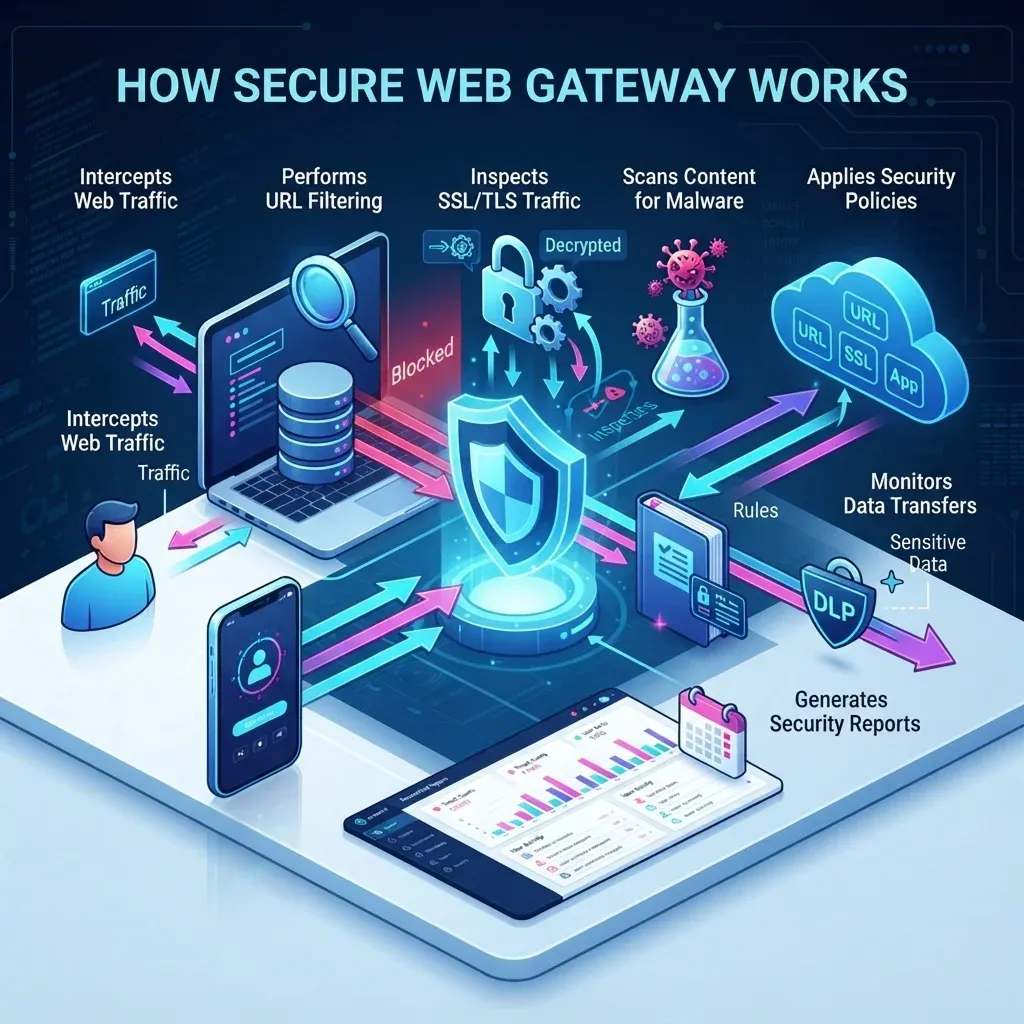
A secure web gateway sits between users and the internet, inspecting every web request before allowing access. It evaluates traffic using multiple security technologies to determine whether content is safe.
1. Intercepts Web Traffic
When a user attempts to visit a website or access a cloud application, the request first passes through the secure web gateway before reaching the destination.
This allows the SWG to inspect both incoming and outgoing web traffic before it reaches the user or leaves the organization.
2. Performs URL Filtering
The gateway compares requested websites against threat intelligence databases and predefined policies. If the destination is known for phishing, malware, scams, or other malicious activities, access is immediately blocked.
Organizations can also restrict access to categories such as gambling, adult content, torrent sites, or social media based on business policies.
3. Inspects SSL/TLS Traffic
Most modern websites use HTTPS encryption, which can hide malicious content. An SWG decrypts encrypted traffic, scans it for threats, and then re-encrypts it before forwarding it to the user. This ensures hidden malware or phishing pages cannot bypass security controls.
4. Scans Content for Malware
Files downloaded from the web are analyzed using multiple detection techniques, including antivirus engines, heuristic analysis, reputation services, and sometimes sandboxing. Suspicious downloads are blocked before reaching the user’s device.
5. Applies Security Policies
Organizations define rules governing what users can access, which files can be downloaded, and which cloud services are allowed. The SWG enforces these policies consistently across all users.
6. Monitors Data Transfers
The gateway examines outbound traffic to identify attempts to upload confidential or sensitive information. Integrated data loss prevention (DLP) capabilities help prevent accidental or intentional data leaks.
7. Generates Security Reports
The SWG logs browsing activity, blocked threats, policy violations, and user behavior, enabling security teams to investigate incidents and demonstrate compliance.
Key Features of a Secure Web Gateway
Modern SWG solutions combine multiple layers of protection into a single platform.
URL Filtering
Blocks access to malicious, suspicious, or inappropriate websites based on continuously updated threat intelligence.
Malware Detection
Scans downloads and web content for viruses, ransomware, spyware, trojans, and other malicious software before they reach users.
SSL Inspection
Decrypts encrypted HTTPS traffic for security inspection without compromising policy enforcement.
Application Control
Allows organizations to monitor and regulate access to cloud applications, SaaS platforms, and web-based services.
Data Loss Prevention (DLP)
Prevents sensitive information, such as financial records, customer data, or intellectual property, from leaving the organization via web channels.
Threat Intelligence Integration
Uses global threat feeds to identify newly discovered malicious domains, IP addresses, and attack infrastructure.
User Authentication
Applies security policies based on user identity, department, device, or location rather than only IP addresses.
Real-Time Reporting
Provides dashboards, alerts, audit logs, and analytics for monitoring internet usage and security incidents.
Cloud-Based Protection
Protects remote users regardless of location without requiring them to connect through a corporate network.
Benefits of Using a Secure Web Gateway
Organizations of all sizes benefit from deploying an SWG as part of their cybersecurity strategy.
Enhanced Threat Protection
Blocks phishing attacks, malicious websites, ransomware, malware downloads, and exploit kits before they reach users.
Improved Employee Productivity
Restricts access to distracting or non-business websites, helping employees stay focused.
Better Compliance
Supports regulatory requirements by enforcing internet usage policies and protecting sensitive information.
Secure Remote Workforce
Protects employees working from home, branch offices, or while traveling through cloud-delivered security services.
Reduced Data Leakage
Monitors outbound traffic to prevent confidential information from being exposed.
Centralized Security Management
Administrators can define and manage security policies across all users from a single console.
Best Practices for Implementing a Secure Web Gateway
The following are the best practices for implementing a secure web gateway.
Define Clear Web Security Policies
Before deploying a Secure Web Gateway (SWG), organizations should establish clear internet usage and security policies. These policies should specify which websites, applications, and online services employees are allowed to access based on their roles. Well-defined rules help the SWG enforce consistent access controls, reduce exposure to risky websites, and ensure compliance with organizational security requirements.
Enable SSL/TLS Inspection
Since most web traffic is encrypted using HTTPS, cyber threats can often hide within encrypted sessions. Enabling SSL/TLS inspection allows the SWG to decrypt, inspect, and re-encrypt traffic, thereby detecting malware, phishing pages, and other malicious content that would otherwise bypass security controls. Organizations should implement SSL inspection carefully to balance security, privacy, and regulatory requirements.
Keep Threat Intelligence and Security Policies Updated
Cyber threats evolve rapidly, making it essential to keep the SWG’s threat intelligence database and security policies up to date. Regular updates enable the gateway to recognize newly discovered malicious domains, phishing campaigns, ransomware variants, and other emerging threats. Automated updates ensure continuous protection without requiring constant manual intervention.
Integrate with Identity and Access Management (IAM)
Connecting the Secure Web Gateway with an organization’s Identity and Access Management (IAM) solution enables user-based security policies rather than relying solely on IP addresses. This integration allows administrators to enforce different browsing permissions for employees, contractors, executives, and third-party users while maintaining detailed visibility into individual web activity.
Implement Data Loss Prevention (DLP)
A Secure Web Gateway should be configured with Data Loss Prevention (DLP) policies to prevent sensitive information from leaving the organization through web applications, cloud storage services, or file-sharing platforms. DLP can monitor outbound traffic for confidential data, such as customer records, financial information, or intellectual property, and automatically block traffic or alert administrators when policy violations occur.
Apply the Principle of Least Privilege
Organizations should grant users access only to the websites, applications, and cloud services necessary for their job responsibilities. Restricting unnecessary internet access minimizes the attack surface and reduces the chances of employees accidentally visiting malicious websites or downloading harmful content.
Monitor Logs and Security Alerts Regularly
A Secure Web Gateway generates valuable logs and security reports that provide insight into user activity, blocked threats, policy violations, and suspicious behavior. Security teams should regularly review these logs to identify unusual patterns, investigate potential incidents, and fine-tune security policies for improved protection.
Protect Remote and Hybrid Workers
As employees increasingly work from home or other remote locations, organizations should deploy cloud-based SWG solutions that provide consistent security regardless of where users connect. Extending web protection beyond the corporate network ensures that remote workers remain protected against web-based threats without relying solely on VPN connections.
Combine SWG with Other Security Solutions
A Secure Web Gateway is most effective when integrated into a layered security strategy. Combining it with endpoint protection, firewalls, Secure Access Service Edge (SASE), Zero Trust Network Access (ZTNA), email security, and Security Information and Event Management (SIEM) solutions provides comprehensive protection against sophisticated cyberattacks.
Train Employees on Safe Browsing Practices
Technology alone cannot prevent every cyber threat. Organizations should regularly educate employees about phishing attacks, malicious websites, unsafe downloads, and social engineering techniques. When users understand common online risks and follow safe browsing habits, the overall effectiveness of the Secure Web Gateway is significantly enhanced.
Challenges of Secure Web Gateways
While highly effective, SWGs also present certain challenges.
- SSL inspection can introduce processing overhead.
- Incorrect policy configurations may block legitimate websites.
- Privacy considerations must be addressed when inspecting encrypted traffic.
- Continuous policy tuning is required as applications and threats evolve.
- Organizations should carefully balance security with user experience.
Conclusion
A Secure Web Gateway (SWG) is an essential component of modern cybersecurity, providing comprehensive protection against web-based threats while giving organizations greater visibility and control over internet usage. As businesses continue to embrace cloud services, remote work, and digital collaboration, traditional network defenses alone are no longer enough.
By combining URL filtering, malware detection, SSL inspection, application control, and data loss prevention, secure web gateways help organizations reduce cyber risks, protect sensitive data, and maintain compliance with industry regulations. When integrated with technologies such as Zero Trust and SASE, an SWG becomes even more effective at securing users wherever they work.
Frequently Asked Questions (FAQs)
Here are some of the frequently asked questions.
What does SWG stand for in cybersecurity?
SWG stands for Secure Web Gateway. It is a cybersecurity solution that monitors and filters. It secures internet traffic to protect users from web-based threats such as malware, phishing, ransomware, and malicious websites while enforcing organizational security policies.
How does a secure web gateway work?
A secure web gateway acts as an intermediary between users and the internet. It intercepts web traffic, filters URLs, inspects encrypted HTTPS traffic, scans downloads for malware, enforces access policies, and monitors data transfers before allowing communication with external websites.
What are the key features of an SWG solution?
Key features typically include URL filtering, malware protection, SSL inspection, application control, data loss prevention (DLP), threat intelligence integration, user authentication, real-time reporting, cloud application security, and policy enforcement.
What is the difference between a secure web gateway and a firewall?
A firewall primarily controls network traffic entering and leaving a network based on predefined rules. A secure web gateway specifically protects web browsing by filtering internet traffic, blocking malicious websites, inspecting encrypted web sessions, preventing malware downloads, and enforcing internet usage policies. Organizations often use both solutions together for layered security.
Table of Contents