Introduction
Unlike typical viruses, RATs allow hackers to silently control your device from anywhere in the world. From stealing sensitive data to spying through your webcam, RAT malware poses a serious risk to both individuals and businesses. In this guide, we’ll break down everything you need to know about RAT trojans, including how they work, how to detect them, and how to stay protected.
What Is a Remote Access Trojan (RAT)?
A Remote Access Trojan (RAT) is malicious software that enables cybercriminals to remotely access and control a victim’s computer, smartphone, or network. RATs are typically disguised as legitimate files or software. Once installed, they operate in the background without the user’s knowledge, giving attackers full control over the infected system.
RAT Malware vs RAT Virus: What’s the Difference?
Understanding the difference helps clarify how these threats behave and how they should be handled.
What Is RAT Malware?
RAT malware refers to any malicious software that includes a Remote Access Trojan. It is a broad category that covers programs designed to give unauthorized remote control of a device to an attacker.
RAT malware is specifically built for stealth and control. Once installed, it allows hackers to monitor activity, steal sensitive data, and manipulate the system without the user knowing.
What Is a RAT Virus?
The term RAT virus is commonly used, but it is technically incorrect. A virus is a type of malware that can replicate itself and spread automatically to other systems.
RATs, on the other hand, do not self-replicate. They rely on tricking users into installing them, often through phishing emails, fake download pages, or malicious links.
How Does a Remote Access Trojan Work?
RATs work by secretly installing a backdoor on your device, allowing attackers to connect remotely.
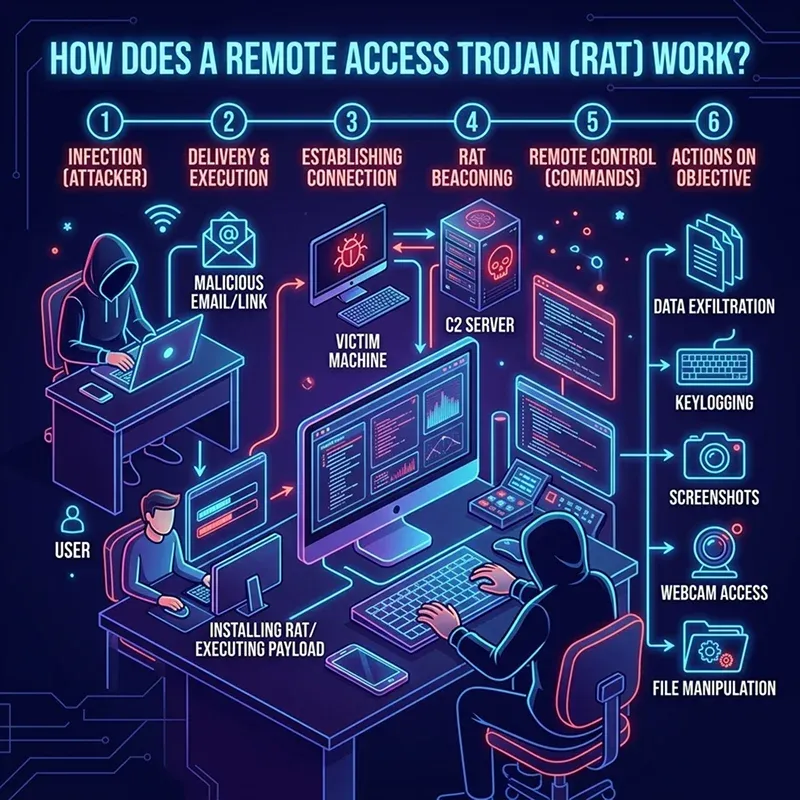
- The RAT is delivered through phishing emails, malicious links, fake software downloads, or cracked applications. Users unknowingly install it, thinking it is legitimate.
- Once executed, the RAT installs itself in the system without showing obvious signs. It may hide within system files to avoid detection.
- The malware creates a hidden “backdoor” in the device, allowing unauthorized access without the user’s knowledge.
- The infected device connects to a remote server controlled by the attacker, establishing a communication channel.
- The attacker gains full or partial control of the system from anywhere in the world via the C2 server.
- Some advanced RATs attempt to gain administrative rights to access deeper system functions and sensitive data.
- The attacker can monitor user activity, capture keystrokes, take screenshots, and even access the webcam and microphone.
- Sensitive information such as passwords, banking details, and personal files can be stolen and transmitted to the attacker.
- The RAT may download and install other types of malware, like spyware, ransomware, or crypto miners.
- The malware ensures it remains active even after system reboots by embedding itself in startup programs or system processes.
- RATs use techniques like encryption and obfuscation to avoid detection by antivirus software.
- Attackers can execute commands on the infected system, including deleting files, modifying data, and controlling applications.
Key RATs Statistics
- RAT activity has steadily increased in 2025, showing that attackers continue to rely on RATs as a primary infection tool.
- There was a ~30% increase in RAT-related activity between early and late 2024, a trend that has continued into 2025–2026.
- In late 2025, RAT attacks rose by around 28%, indicating a shift toward persistent remote access and long-term control.
- A single mobile RAT campaign infected 11,000+ devices, with ~2,000 new infections per week.
- Some RATs can impersonate 200+ banking and crypto apps to steal credentials.
- Banking RAT campaigns in Europe infected thousands of devices (3,000+ in one case) in 2025.
Remote Access Trojan Download: How RATs Spread?
Remote Access Trojans (RATs) rarely appear on a system by accident. They are usually tricked into being downloaded and installed by the user.
Malicious Email Attachments and Phishing Links
One of the most common ways RATs spread is through phishing emails. Attackers send emails that appear legitimate, often disguised as invoices, job offers, or official documents. When users download the attachment or click the link, the RAT is installed silently in the background.
Cracked and Pirated Software Downloads
Downloading cracked software, games, or paid tools from unofficial websites is a major risk. These files are often bundled with hidden RAT malware. Once installed, the RAT gains access to the system while the user believes they’ve installed legitimate software.
Fake Software Updates
Cybercriminals create fake update prompts for popular software such as browsers, media players, and operating systems. When users download these “updates,” they unknowingly install a RAT instead of a legitimate patch.
Malicious Websites and Drive-by Downloads
Simply visiting a compromised or malicious website can trigger a RAT download. These are known as drive-by downloads, where malware installs automatically without requiring much user interaction.
Social Media and Messaging Platforms
Attackers often distribute RATs through social media messages or chat apps. They may send links disguised as videos, photos, or important files. Once clicked, the RAT is downloaded onto the device.
Fake Mobile Apps and Third-Party App Stores
On smartphones, RATs are commonly spread through fake apps or apps downloaded from unofficial app stores. These apps may look legitimate, but they contain hidden malicious code that installs a RAT on the device.
USB Devices and External Media
In some cases, RATs are spread through infected USB drives or external storage devices. When plugged into a computer, the malware can automatically execute and install itself.
Software Bundling with Freeware
Free software downloaded from unreliable sources may include additional hidden programs. These bundled installations often contain RAT malware that gets installed alongside the intended software without clear user consent.
Exploiting Software Vulnerabilities
Attackers can exploit outdated software or unpatched systems to install RATs without user interaction. Vulnerabilities in operating systems or applications provide an entry point for silent infections.
How to Detect a Remote Access Trojan (RAT)?
Detecting a RAT can be difficult because it is designed to stay hidden, but there are warning signs.
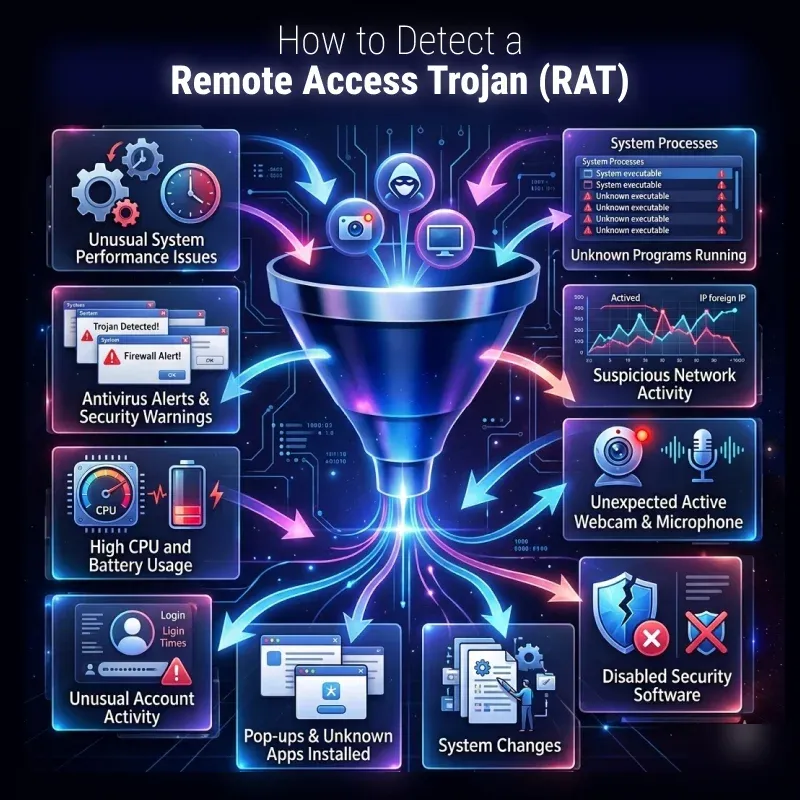
Unusual System Performance Issues
One of the first signs of a RAT infection is a noticeable slowdown in your device. If your computer or phone becomes unusually slow, freezes frequently, or crashes without reason, it could indicate that a malicious program is running in the background.
Unknown Programs Running
RATs often run silently in the background. If you notice unfamiliar applications in your Task Manager or Activity Monitor, especially ones consuming high CPU, it may be a sign of malware.
Suspicious Network Activity
A RAT constantly communicates with a remote server. If your internet usage is unusually high and your firewall shows unknown outgoing connections, it could indicate that data is being sent to an attacker.
Webcam and Microphone Activating Unexpectedly
If your webcam light turns on without your permission, or if your microphone is accessed unexpectedly, this is a strong warning sign. Many RATs are designed for surveillance and spying.
Disabled Security Software
Some advanced RATs can disable antivirus programs or firewall protections. If your security software suddenly stops working or gets turned off without your action, it may indicate a compromise.
System Changes
Unexpected changes, such as files being deleted, renamed, or modified without your knowledge, can be a sign of unauthorized access through a RAT.
Frequent Pop-ups and Unknown Applications Installed
If new programs appear on your device without installation or you start seeing unusual pop-ups, it could be due to malware activity linked to a RAT infection.
Unusual Account Activity
If you notice unauthorized logins, password changes, or suspicious activity in your online accounts, a RAT may be capturing your credentials and transmitting them to attackers.
High CPU and Battery Usage
RATs running in the background can consume system resources. This may result in high CPU usage or rapid battery drain, especially on mobile devices.
Antivirus Alerts and Security Warnings
If your antivirus or anti-malware software flags suspicious activity or detects a potential threat, it’s important not to ignore it. These alerts could indicate the presence of a RAT.
RAT Detector: Tools to Identify RAT Malware
A RAT detector is typically part of advanced antivirus and anti-malware software.
Antivirus Software with Real-Time Protection
Modern antivirus programs are the first line of defense against RAT malware. They use signature-based detection and behavior analysis to identify suspicious files and activities. Real-time protection helps block RATs before they fully install on your system.
Anti-Malware Scanners
Anti-malware tools go beyond traditional antivirus by detecting advanced threats like RATs, spyware, and trojans. They can scan deeply into your system to uncover hidden malicious programs that may not be immediately visible.
Firewall Monitoring Tools
A firewall acts as a barrier between your device and external networks. It can alert you to suspicious incoming or outgoing connections, which is crucial since RATs rely on communicating with remote command-and-control servers.
Network Traffic Analyzers
These tools monitor your internet traffic for unusual patterns. Since RATs constantly send and receive data from attackers, abnormal network activity can be a strong indicator of infection.
Endpoint Detection and Response (EDR) Tools
EDR solutions are advanced security systems used by organizations to monitor and respond to threats in real time. They detect unusual behavior, such as unauthorized access attempts and suspicious processes, which are common signs of RAT activity.
System Monitoring Tools
Utilities that track system performance and processes can help identify unknown or suspicious programs running in the background. Monitoring CPU, memory usage, and startup programs can reveal hidden RATs.
Rootkit Detection Tools
Some RATs use rootkit techniques to hide deep within the system. Rootkit detection tools are designed to uncover these deeply embedded threats that standard antivirus software might miss.
Log Analysis Tools
System logs and security logs can provide valuable insights into unusual activities. Log analysis tools help identify unauthorized access attempts, abnormal login behavior, and suspicious system changes.
Browser Security Extensions
Certain RAT infections begin through malicious websites or downloads. Browser security tools can block harmful sites, detect unsafe downloads, and prevent RAT installation at the source.
Regular System Updates and Security Patches
While not a detection tool in itself, keeping your system updated helps close vulnerabilities that RATs exploit. Many detection tools also rely on updated threat databases to identify the latest malware variants.
How to Detect a Remote Access Trojan Manually?
You can also perform manual checks to identify suspicious activity:
Check Running Processes in Task Manager
Open your system’s task manager and review all active processes. Look for unknown or suspicious programs that you did not install. Pay attention to processes using unusually high CPU, memory, or network resources, as RATs often run silently in the background.
Review Startup Programs
RAT malware often configures itself to run automatically at startup. Check your startup applications and disable anything unfamiliar or suspicious. If a program keeps reappearing after removal, it may indicate a persistent RAT infection.
Inspect Installed Applications
Go through the list of installed software on your device. Look for programs you don’t recognize or don’t remember installing. Some RATs disguise themselves as legitimate tools to avoid detection.
Monitor Network Connections
Since RATs communicate with remote attackers, monitoring network activity is very important. Check for unknown outgoing connections or unusual data usage, especially when your system is idle. Persistent connections to unknown IP addresses are a major warning sign.
Check Webcam and Microphone Access
If your webcam light turns on unexpectedly or your microphone shows activity without your permission, it could indicate unauthorized remote access. RATs often enable surveillance features without user consent.
Look for Disabled Security Tools
Manually verify that your antivirus, firewall, and security settings are active. If they are turned off or cannot be enabled again, this may suggest that malware is interfering with your system protection.
Examine File and System Changes
Check for unusual file modifications, missing documents, or new unknown files. RATs may modify and delete system files or install additional malware on your device.
Review Browser and Account Activity
Unusual browser behavior, such as unexpected redirects or new extensions, can indicate infection. Also, check your online accounts for unauthorized logins or changes in passwords.
Check for Remote Access Tools You Didn’t Install
RATs disguise themselves as legitimate remote tools, such as screen-sharing applications. If you find any remote access software you didn’t install, investigate it immediately.
How to Remove a RAT Trojan?
Removing a Remote Access Trojan (RAT) requires prompt action, as it can continue silently stealing data and controlling your device. Follow these steps carefully to eliminate the infection and secure your system.
Disconnect from the Internet Immediately
As soon as you suspect a RAT infection, disconnect your device from Wi-Fi or unplug the Ethernet cable. This prevents the attacker from maintaining remote access or stealing additional data.
Boot into Safe Mode
Restart your computer in Safe Mode to stop most malware processes from running. In Safe Mode, only essential system services load, making it easier to detect and remove the RAT.
Run a Full Antivirus Scan
Use a trusted, up-to-date antivirus program to run a complete system scan. Most modern security tools can automatically detect and quarantine known RAT variants.
Use Anti-Malware Tools for Deep Cleaning
In addition to antivirus software, run specialized anti-malware tools. These tools are designed to detect hidden trojans, spyware, and rootkits that may evade standard scans.
Remove Suspicious Programs Manually
Check your installed applications and uninstall any unknown or suspicious software. Also, review startup programs and disable anything unfamiliar that may be linked to the RAT.
Check and Clean Browser Extensions
Remove any unknown browser extensions or plugins. RAT infections often install malicious extensions to monitor browsing activity and redirect traffic.
Reset All Passwords
After cleaning your system, change all important passwords, including email, banking, and social media accounts. Do this from a different, secure device to prevent credential theft.
Update Your Operating System and Software
Install the latest system updates and security patches. This helps close vulnerabilities that RATs may have exploited to gain access to your device.
Reset or Reinstall the Operating System
If the RAT persists or cannot be fully removed, the safest option is to perform a full system reset or reinstall the operating system. This ensures the complete removal of hidden malware components.
Monitor System Activity After Removal
After cleanup, continue monitoring your system for any unusual behavior, such as slow performance, unknown processes, or strange network activity, to ensure the infection is gone.
How to Prevent RAT Malware Attacks?
Preventing Remote Access Trojan (RAT) malware is far easier than removing it. Since RATs rely heavily on user mistakes and system weaknesses, strong security habits can significantly reduce the risk of infection.
Avoid Downloading Cracked or Pirated Software
One of the most common sources of RAT infections is illegal or cracked software. These files are often bundled with hidden malware. Always download software from official websites and trusted app stores.
Be Careful with Email Attachments and Links
Phishing emails are a major delivery method for RATs. Avoid opening attachments or clicking links from unknown or suspicious senders, especially if the message creates a sense of urgency.
Keep Your System and Software Updated
Regular updates fix security vulnerabilities that attackers can exploit. Keeping your operating system, browsers, and apps updated helps close entry points used by RAT malware.
Use Strong and Unique Passwords
Weak passwords make it easier for attackers to exploit compromised systems. Use complex passwords and enable two-factor authentication (2FA) wherever possible to protect your accounts.
Install Trusted Antivirus and Anti-Malware Software
A reliable security suite can detect and block RATs before they fully install. Make sure real-time protection is enabled and virus definitions are updated regularly.
Enable Firewall Protection
A firewall monitors incoming and outgoing network traffic. It can block unauthorized connections, which is crucial because RATs rely on remote communication with attackers.
Avoid Unknown USB Devices and External Drives
RATs can spread through infected USB drives or external storage devices. Only use trusted devices and disable automatic execution features where possible.
Download Apps Only from Trusted Sources
On mobile devices, avoid third-party app stores. Fake apps often contain hidden RAT malware that steals data and spies on users.
Watch Out for Suspicious Pop-Ups and Fake Updates
Never install software or updates from random pop-ups or websites. Always update software directly through official applications and system settings.
Regularly Monitor System Activity
Keep an eye on running processes, network usage, and installed programs. Early detection of unusual behavior can prevent serious damage from RAT infections.
Conclusion
Remote Access Trojans (RATs) are among the most dangerous types of malware because they give attackers complete control over your device. Whether referred to as a RAT virus, RAT trojan, or RAT malware, the threat remains serious.
Understanding how RATs work, recognizing the warning signs, and using proper security tools can help you stay protected. By practicing safe browsing habits and maintaining strong cybersecurity defenses, you can significantly reduce the risk of falling victim to a RAT attack.
FAQs
Here are some frequently asked questions.
What does RAT malware do on a computer or phone?
RAT malware allows attackers to remotely control your device, steal data, monitor activity, and even access your camera and microphone.
Is a RAT the same as a virus, or is it different from other malware?
A RAT is different from a virus. It is a type of Trojan malware that provides remote access rather than self-replicating like traditional viruses.
What is RAT software, and how is it used?
RAT software can be legitimate for remote administration, but cybercriminals use it to spy, steal data, and control devices without permission.
Can antivirus software detect and remove RATs?
Yes, most modern antivirus and anti-malware tools can detect and remove RATs, especially with updated virus definitions.
What are the common signs of RAT malware infection?
Common signs include slow performance, unknown apps, unusual network activity, webcam activation, and disabled security tools.
Table of Contents