One of the fastest-growing cyber threats today is quishing, also known as QR code phishing. According to the 2025 Cybersecurity Threat Report, QR-based phishing attacks increased by over 25% in a single year, driven by the rise of remote work, digital payments, and social engineering. Attackers now use QR codes to conceal malicious links, circumvent security filters, and deceive users into divulging sensitive information.
This blog explains what quishing is, how it works, provides examples of real attacks, outlines prevention strategies, and shows you how to check whether a QR code is safe so that you can stay protected in a hyper-digital world.
What Is Quishing?
Quishing is a type of phishing attack where cybercriminals use QR codes instead of traditional clickable links to trick victims. When scanned, the QR code redirects users to fake websites designed to steal passwords, banking information, personal data, or install malware. Unlike email phishing, quishing is harder to detect because QR codes hide the destination URL, making users more likely to trust and scan them without thinking.
What Is a Quishing Attack?
A quishing attack is any cyber-attack where a QR code is used as the primary tool to mislead a victim. These attacks typically appear in emails, posters, packages, and even restaurant tables.
Common goals of quishing attacks include:
- Stealing usernames and passwords
- Gaining access to bank accounts
- Installing spyware or ransomware
- Collecting personal information for identity theft
- Hijacking social media or business accounts
How Quishing Works?
A quishing attack typically follows a simple but effective process. The simplicity of this approach makes it particularly dangerous, as individuals are often unaware of the risks involved.
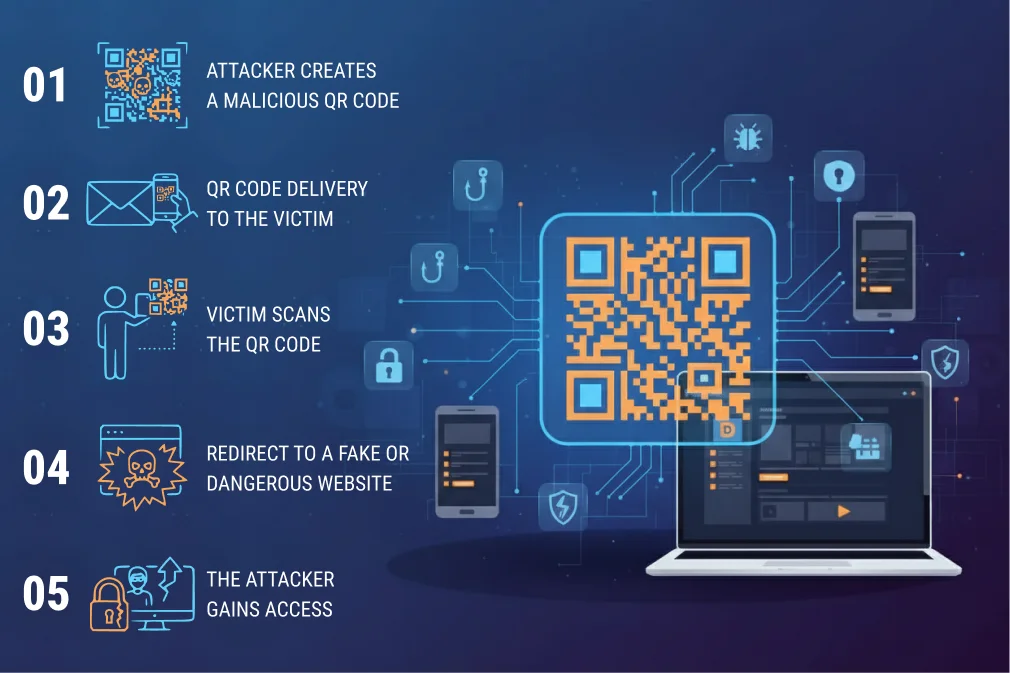
1. The Attacker Creates a Malicious QR Code
Cybercriminals often generate QR codes that lead unsuspecting users to fraudulent websites or links infected with malware. When scanned with a smartphone or other devices, these codes can redirect individuals to sites that appear legitimate, prompting them to enter sensitive information.
Alternatively, the malicious links can download harmful software onto the device without the user’s knowledge. Users should be cautious when scanning QR codes to protect themselves against potential cyber threats.
2. The QR Code Is Delivered to the Victim
Delivery methods include:
- Email or SMS
- Posters and stickers
- Social media messages
- WhatsApp/Telegram forwards
- Fake advertisements
- Physical mail and packages
3. Victim Scans the QR Code
When a user scans a code, such as a QR code or a barcode, without verifying the source, several risks and considerations arise. This scenario is increasingly relevant in our digital age, where quick access to information often takes precedence over scrutiny.
4. Redirect to a Fake or Dangerous Website
The attacker may:
- Steal login credentials
- Install malware
- Collect banking/digital wallet info.
- Track the device
5. The Attacker Gains Access
Once the victim submits their information, whether through phishing emails, the attackers can gain direct access to their accounts. This often includes online banking accounts, shopping platforms, or social media profiles.
QR Code Phishing: How It Relates to Quishing?
QR code phishing is simply the phishing technique behind quishing. Instead of sending a clickable link, attackers send a QR image that redirects to a phishing website.
Why it works so well:
- People trust QR codes more than links
- You can’t visually inspect a QR code.
- Security filters often struggle to effectively detect malicious QR images.
- Scammers can place them anywhere in the physical world
QR Phishing Scam
A QR phishing scam is a deceptive act where a criminal sends or displays a QR code to trick victims into scanning it. Once scanned, the code redirects the user to a scam website, such as a fake payment page or login portal. In 2024, the FBI issued a warning to businesses about a surge in QR-based scams affecting thousands of users, particularly those involving payment fraud.
Examples include:
- Scams asking for parcel delivery payments
- Fake parking meter payment QR codes
- Restaurant QR menus replaced with malicious codes.
- Fake bank verification messages
- Social media “verification” QR links
What is QR Code Scam?
A QR code scam refers to any fraudulent activity that uses QR codes. Not all QR scams involve phishing. Some may also include malware downloads, fake apps, or fraudulent payments. QR code scams are becoming common because they require no technical skill; anyone can print and paste a phony QR code.
For example:
- Scammers place fake QR codes on parking machines to steal money.
- Criminals use QR stickers on ATMs to redirect users to malicious banking websites.
Quishing Examples
Here are some real-world and common scenarios where quishing occurs:
1. Fake Delivery Notifications
You receive an SMS or email claiming a parcel could not be delivered, with a QR code to “reschedule delivery.” The QR leads to a fake courier website demanding payment.
2. Parking Meter QR Scam
Attackers replace the real QR code on a parking machine with a sticker. Scanning the fake one sends payment to a scammer’s account.
3. Restaurant Menu Code Swap
Cybercriminals print similar-looking QR stickers and put them over restaurant menus. Victims unknowingly scan fake codes, which can lead to malware or phishing sites.
4. Office or School Wi-Fi QR Code
A QR code posted on a wall appears to offer free Wi-Fi. Scanning takes users to a malicious login page that steals credentials.
5. Social Media Verification Scam
A scammer pretends to be an Instagram or TikTok support representative, sending a QR code to “verify your account.” It leads to a fake login page that steals your password.
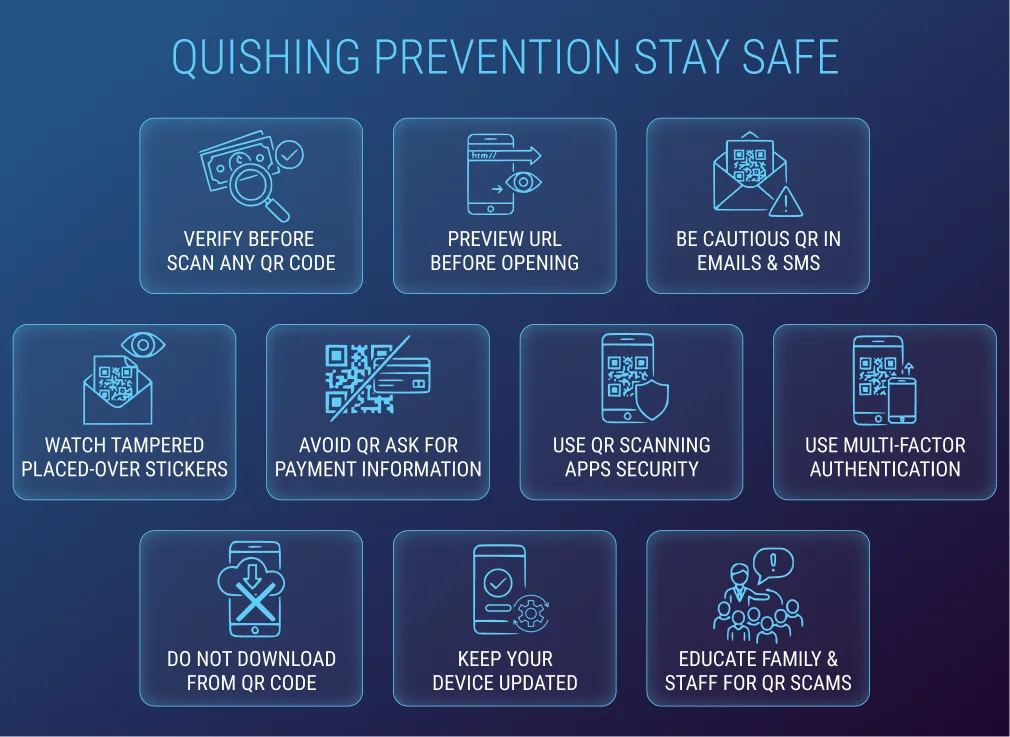
Quishing Prevention: How to Stay Safe?
As quishing continues to grow worldwide, protecting yourself from QR code phishing attacks is essential. Cybersecurity reports from 2024 show a 270% increase in malicious QR code incidents, mainly targeting everyday users through emails, posters, delivery scams, and payment fraud. Because QR codes hide their destination links, they can easily mislead even tech-savvy individuals. The best defense is awareness and adhering to proper security practices. Below are the most effective strategies to prevent quishing.
1. Verify the Source Before Scanning Any QR Code
The simplest way to stay safe is to avoid scanning QR codes from unknown, suspicious, or unverified sources. Criminals often place fake QR stickers in public places, including parking lots, restaurants, and bus stops. If the code appears out of place, worn out, or pasted over another design, do not scan it. Trusted QR codes should come from official websites, known brands, or verified communication channels.
2. Always Preview the URL Before Opening It
Most modern phones display the link embedded in the QR code before it fully opens. Carefully check the URL for:
- Strange spelling errors
- Unfamiliar domain names
- Missing HTTPS security indicators
- Long or suspicious-looking URLs
3. Be Cautious With QR Codes in Emails and SMS Messages
Email-based quishing has surged because it helps scammers bypass spam filters. Hackers send QR codes pretending to be from banks, delivery services, or government departments. Even if the email looks professional, do not trust QR codes in unsolicited messages.
If you receive an email from a company claiming urgent action, visit the official website directly instead of scanning the QR code.
4. Watch for Tampered or Placed-Over QR Stickers
Many real-world quishing attacks happen through sticker tampering. Attackers print fake QR codes and paste them over legitimate ones, particularly in areas where users typically expect to scan QR codes for payments, menus, or parking.
If the QR code appears like a sticker or looks newly placed, gently check the edges or compare it with nearby signage. Businesses rarely replace QR codes frequently so a fresh-looking sticker could be a red flag.
5. Avoid QR Codes That Ask for Payment Information
Legitimate institutions rarely require payments without proper authentication steps. If a QR code directly leads you to a payment page, especially one that demands urgent action or clearance of a late fee, it may be a scam.
The FBI reported that over 60% of QR code fraud cases in 2024 involved fake payment portals, particularly for parking and delivery services. Always double-check on the official website before making a payment.
6. Use QR Code Scanning Apps With Security Features
Some security-focused QR scanner apps automatically detect and warn users of dangerous or suspicious URLs. These apps check for malicious patterns, blacklisted domains, and unsafe file downloads.
Although your phone’s built-in camera can scan QR codes, dedicated apps add an extra layer of protection, especially for frequent QR users.
7. Enable Multi-Factor Authentication (MFA) on All Accounts
Even if you accidentally scan a malicious QR code and enter your credentials, MFA can prevent attackers from accessing your account. MFA acts as a second layer of security, requiring an additional verification step, such as an SMS code or authenticator app.
According to Microsoft, MFA can block up to 99% of account takeover attempts, making it one of the strongest cybersecurity practices available.
8. Do Not Download Files or Apps From a QR Code
If a QR code prompts you to download unknown apps, files, or APKs, do not proceed. This is a standard method to install malware on devices. Only download apps from trusted app stores like Google Play or the Apple App Store.
9. Keep Your Device Updated
Software updates include security patches that protect against newly discovered vulnerabilities. Outdated smartphones are more susceptible to malware, spyware, and phishing attacks that can be triggered through QR codes.
Keeping your phone updated ensures you have the latest security protections built into your operating system.
10. Educate Family and Staff About QR Code Scams
Quishing does not only target tech-savvy individuals; elderly users, children, and office staff are often victims too. Educating others about QR threats increases overall safety.
Businesses should conduct training sessions that include recognizing fake QR codes and verifying official communication channels.
QR Code Security
QR code security encompasses practices that ensure QR codes are secure for both users and businesses. Organizations can improve security by:
- Using brand-specific, trackable QR codes
- Adding digital signatures to QR codes
- Monitoring for QR tampering on physical signage
- Educating customers about avoiding suspicious QR codes
- Using secure domains and HTTPS encryption
Conclusion
Quishing is a growing phishing threat. It uses QR codes to deceive users. As QR codes are increasingly used in payments and services, cybercriminals are exploiting them. Understanding how quishing works is essential. Recognize common scams to stay safe. Preventative measures help reduce risks. Always check URLs before scanning. Avoid random QR codes from unknown sources. Enabling multi-factor authentication adds an extra layer of security. Both individuals and businesses should stay vigilant.
FAQs
Here are some frequently asked questions.
1. How to check if a QR code is safe?
Preview the URL before opening.
Look for HTTPS.
Check if the QR appears tampered (like a sticker).
Avoid codes from unknown senders.
Use antivirus or QR scanning safety apps.
2. What is the difference between phishing and quishing?
Phishing: Uses links in emails, SMS messages, or on websites.
Quishing: Utilizes QR codes to conceal malicious links and deceive users into scanning them.
3. What happens when you scan a malicious QR code?
Scanning a malicious QR code may:
Redirect you to a fake website
Install malware
Steal login credentials
Take payment information
Gain access to your phone data.
4. Can a QR code contain a virus?
A QR code itself cannot contain a virus. However, it can direct you to a website that installs malware on your device.
5. Can quishing happen through social media?
Yes. Attackers often send QR codes via:
Instagram DMs
Facebook Messenger
TikTok messages
Telegram groups
Table of Contents