A backdoor attack is probably the most threatening method of all. A backdoor, i.e., a backdoor, allows attackers to bypass security measures effectively, as it provides a secret, hidden entry point, whereas most other cyber threats are visible. In 2025, a report in a cybersecurity magazine indicated that backdoor malware had been detected 6% more than in 2024.
A backdoor is a very serious weapon in the hands of a cyber attacker, as it may remain hidden for several months at a time, during which the attacker can find ways to exploit access to the compromised system. In 2026, security researchers revealed that several large-scale operations involved compromised websites that injected malicious scripts, leading to backdoors installed on users’ devices. It is essential that you educate yourself about the workings of backdoors, the dangers they pose, and, most importantly, the measures you can take to protect your system, thereby ensuring your security.
What Is a Backdoor?
A backdoor is a hidden method of bypassing normal authentication and security controls to gain access to a computer system, application and network. It serves as a secret entry point that allows users, developers, and cybercriminals to access a system without following standard login procedures.
Some backdoors are intentionally created during software development for testing and maintenance purposes. However, when malicious actors discover these hidden access points, they can use them to steal data, install malware, monitor user activity, and take control of affected systems.
What Is a Backdoor Attack?
A backdoor attack occurs when cybercriminals exploit a hidden entry point to gain unauthorized access to a system. Once they gain access, attackers can carry out various malicious activities without the victim’s knowledge.
Unlike many cyberattacks that trigger alerts due to suspicious login attempts, backdoor attacks occur quietly. Attackers use the backdoor to maintain long-term access, collect confidential information, deploy additional malware, and manipulate system settings. These attacks are particularly dangerous because they enable criminals to bypass traditional security measures and remain undetected for extended periods.
What Is Backdoor Malware?
Backdoor malware is malicious software designed to create a hidden access channel within a device. After infecting a system, it enables attackers to control the compromised machine and perform unauthorized actions remotely.
Backdoor malware operates in the background, without causing obvious symptoms. Once installed, it can communicate with a command-and-control server, allowing cybercriminals to issue commands remotely.
Common functions of backdoor malware include:
- Stealing passwords and login credentials
- Downloading additional malware
- Monitoring user activity
- Recording keystrokes
- Turning off security software
- Accessing sensitive files
- Taking complete control of infected systems
What Is a Backdoor Virus?
“Backdoor virus” is a term many people use to refer to malware that grants unauthorized access to a system. Many backdoor malware types aren’t really viruses, as they don’t necessarily have the ability to self-replicate. Most commonly, they come under the categories of Trojans, remote access tools, or malware loaders.
Technically speaking, many people still use the term “backdoor virus” to mean any kind of malicious software that quietly provides attackers with a way in. No matter the classification, the result could be very damaging, as these threats may lead to data loss, privacy violations, and damage to the integrity of the system.
What is a Backdoor Trojan?
A backdoor Trojan is a type of malware that pretends to be legitimate software while secretly setting up unauthorized access to a device.
Users unknowingly install a backdoor Trojan after they have downloaded:
- Fake software update
- Cracked application
- Pirated software
- Malicious email attachment
- Infected files from untrusted websites
Once installed, the Trojan establishes a hidden communication channel that attackers can use to remotely control the infected system. Backdoor Trojans are among the most common methods used by cybercriminals to establish persistent access to victim devices.
How Do Backdoor Attacks Work?
The attacker will initially initiate the phishing or other tactics to gain access to the victim’s device.
Initial Compromise
Attackers use several methods to trick the victims or exploit software vulnerabilities: sending fraudulent emails that fool users into divulging confidential data or performing some actions, planting malware on the victims’ devices, unauthorized access to the network through weaknesses or software vulnerabilities, exploiting compromised websites that are used to distribute malware, and the use of infected USB devices.
Backdoor Installation
Once the attackers are inside, their ideal approach is to hide from the system owners. After a successful infiltration, they use the malware to create a new official entry point for later use.
Persistence
The malicious software changes system configurations, modifies registry values, activates hidden system startup processes, and creates highly scheduled tasks so that the corruption persists after reboots.
Remote Control
The compromised system communicates with the attackers’ management infrastructure, enabling remote command execution and data transfer.
Malicious Activities
The aim of the attackers is to obtain confidential information, to drop more malware, to encrypt the victim’s files against the owner’s will, to monitor users, and to use the compromised devices in larger cybercrime operations.
Common Types of Backdoor Attacks
These are the most common types of Backdoor attacks.
Trojan-Based Backdoor Attacks
Trojan-based backdoor attacks are among the most common forms of backdoor infections. In these attacks, cybercriminals disguise malicious software as a legitimate application, file, and software update. Once a user downloads and installs the program, the malware silently creates a hidden access point within the system. This allows attackers to connect remotely, steal sensitive data, install additional malware, and monitor user activity without the victim’s knowledge.
Remote Access Trojan (RAT) Attacks
Remote Access Trojans (RATs) are designed to give attackers direct control over infected devices. After installation, a RAT enables cybercriminals to access files, capture screenshots, record keystrokes, activate webcams, and execute commands remotely. Because RATs operate in the background and often mimic legitimate processes, they can remain undetected for long periods, which allows attackers to exert extensive control over compromised systems.
Software Vulnerability Backdoor Attacks
Many backdoor attacks exploit security flaws in outdated software, operating systems, and applications. When attackers discover an unpatched vulnerability, they can use it to gain unauthorized access and install a backdoor for future use. Once the backdoor is established, attackers can bypass security measures and return to the system at will, after the original vulnerability has been fixed.
Web Application Backdoor Attacks
Web application backdoors target websites, web servers, and online applications. Attackers inject malicious scripts, web shells, and hidden code into vulnerable applications. These backdoors allow them to access the server remotely, manipulate website content, steal customer information, and deploy additional malware. Web application backdoors are particularly dangerous because they can compromise website owners and visitors.
Rootkit-Based Backdoor Attacks
Rootkits are advanced forms of malware designed to conceal malicious activity from users and security software. When combined with a backdoor, a rootkit enables attackers to maintain persistent access while remaining hidden deep within the operating system. Rootkit-based backdoors are difficult to detect because they modify core system functions, rendering traditional security tools less effective at identifying them.
Supply Chain Backdoor Attacks
In a supply chain attack, cybercriminals compromise trusted software vendors, service providers, and development environments. They insert malicious code into legitimate software updates distributed to thousands of users. Once installed, the infected software creates a backdoor that gives attackers access to every affected system. These attacks are highly effective because users trust updates from reputable sources.
Credential-Based Backdoor Attacks
Credential-based backdoor attacks occur when attackers obtain valid usernames and passwords through phishing campaigns, data breaches, and credential theft malware. After gaining access, they create hidden administrator accounts, modify access permissions, and install remote management tools to maintain continued access to the system. This approach allows attackers to maintain access if the stolen credentials are later changed.
Hardware Backdoor Attacks
Hardware backdoors involve malicious modifications to physical devices such as routers, network equipment, and computer components. These hidden access mechanisms can be introduced during manufacturing, distribution, and deployment. Since the backdoor exists at the hardware level, it can be extremely difficult to detect and remove, making it a serious threat to organizations that rely on critical infrastructure.
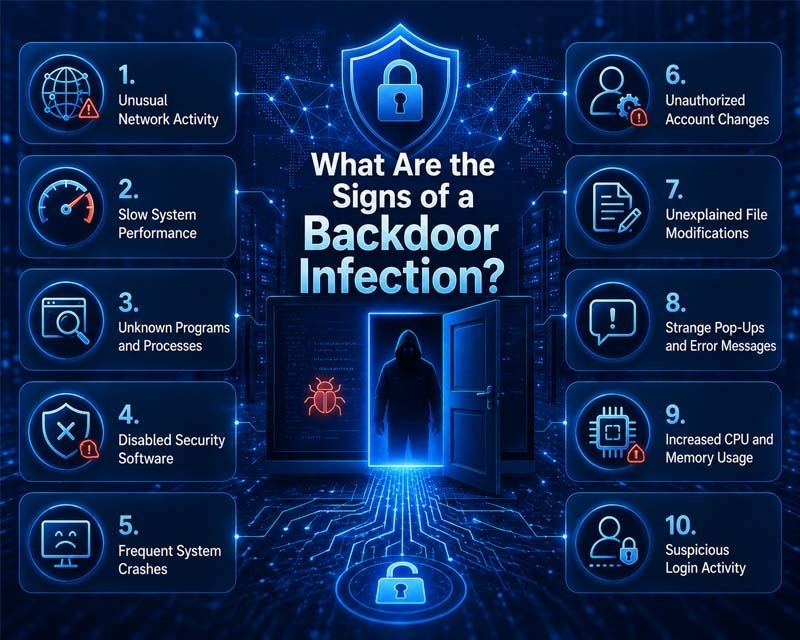
What Are the Signs of a Backdoor Infection?
Backdoor malware operates quietly, but several warning signs indicate a compromise.
Unusual Network Activity
One of the most common indicators of a backdoor infection is unexpected network traffic. Backdoor malware frequently communicates with remote servers controlled by attackers to receive commands and transmit stolen data. If your internet connection appears unusually busy despite minimal activity, it indicates that a hidden process is running in the background.
Slow System Performance
A sudden decline in system speed can indicate that malicious software is consuming processing power and memory resources. Backdoor malware runs continuously in the background, causing applications to respond slowly, increasing startup times, and reducing overall system performance.
Unknown Programs and Processes
If you notice unfamiliar applications, services, and background processes running on your device, it could signal a backdoor infection. Many backdoor threats install additional components that operate silently without user authorization. Reviewing active processes can help identify suspicious activity.
Disabled Security Software
Cybercriminals often attempt to turn off antivirus programs, firewalls, and other security tools after gaining access to a system. If security software suddenly stops working, fails to update, and becomes inaccessible without explanation, malware can be interfering with its operation.
Frequent System Crashes
Backdoor malware can modify critical system files and settings, leading to instability. As a result, infected devices experience unexpected crashes, freezing, application errors, and frequent system restarts.
Unauthorized Account Changes
Changes to user accounts, passwords, security settings, and administrator privileges that you did not initiate may indicate unauthorized access. Attackers create hidden accounts and modify permissions to maintain long-term control of compromised systems.
Unexplained File Modifications
Files that suddenly disappear, become corrupted, and appear altered without your knowledge can be a sign of malicious activity. Backdoor malware may access, modify, copy, or delete files as part of a broader attack.
Strange Pop-Ups and Error Messages
Unexpected pop-ups, fake security alerts, and unusual error messages indicate malware activity. While not all backdoor infections exhibit these symptoms, some threats trigger system warnings due to malicious modifications.
Increased CPU and Memory Usage
A device that consistently shows high processor and memory usage even when running only a few applications may be infected. Backdoor malware often performs hidden tasks such as data collection, remote communication, and malware downloads, which consume system resources.
Suspicious Login Activity
Notifications about logins from unknown locations, unusual account activity, and failed login attempts can indicate that attackers have gained access through a backdoor. Monitoring account security alerts can help identify potential compromises before significant damage occurs.
How to Prevent Backdoor Attacks?
Preventing backdoor attacks requires a combination of strong security practices, regular system maintenance, and user awareness. Since backdoors are often designed to evade detection, taking proactive measures is essential to reduce the risk of unauthorized access and protect sensitive data.
Keep Software and Operating Systems Updated
Outdated software contains security vulnerabilities that attackers can exploit to install backdoors. Regularly updating operating systems, applications, browsers, and security tools helps close known security gaps and reduces the chances of a successful attack. Enabling automatic updates can ensure critical patches are applied as soon as they become available.
Use Reliable Antivirus and Endpoint Protection
A reputable antivirus solution can detect and block many forms of backdoor malware before they infect a device. Modern endpoint protection platforms provide advanced threat detection, real-time monitoring, and behavioral analysis that can identify suspicious activities associated with backdoor attacks.
Download Software From Trusted Sources
Many backdoor infections originate from fake applications, pirated software, and unofficial downloads. Always obtain software directly from legitimate vendors, official app stores, and trusted websites. Verifying the authenticity of downloads helps prevent malicious programs from entering your system.
Be Cautious With Email Attachments and Links
Phishing emails remain a common method for delivering backdoor malware. Avoid opening unexpected attachments, downloading files from unknown senders, and clicking suspicious links. Carefully inspect emails for signs of fraud before interacting with any content.
Enable Multi-Factor Authentication (MFA)
Multi-factor authentication adds a layer of security beyond passwords. If attackers obtain login credentials, MFA significantly increases the difficulty of gaining access to accounts and systems. This extra protection can help prevent unauthorized access attempts.
Restrict Administrative Privileges
Limiting administrator access reduces the potential impact of a successful attack. Users should operate with standard privileges whenever possible, granting elevated permissions only when necessary. This approach minimizes opportunities for malware to make critical system changes.
Monitor Network Traffic
Regular network monitoring can help identify unusual connections and suspicious outbound communications that can indicate a backdoor infection. Security teams use intrusion detection systems and network monitoring tools to spot unauthorized activity before it escalates.
Use Strong Password Practices
Weak passwords make it easier for attackers to gain access to systems and establish persistent backdoors. Create unique, complex passwords for every account and update them regularly. Password managers can help generate and securely store strong credentials.
Conduct Regular Security Audits
Routine security assessments can uncover vulnerabilities, misconfigurations, and outdated software that attackers target. Regular audits help organizations identify weaknesses and strengthen defenses before a cybercriminal can exploit them.
Educate Employees and Users
Human error remains one of the leading causes of security breaches. Providing cybersecurity awareness training helps users recognize phishing attempts, suspicious downloads, and other common attack methods. Informed users are less likely to fall victim to tactics that lead to backdoor infections.
Secure Remote Access Services
Remote access tools and services should be protected with strong authentication, encryption, and access controls. Unsecured remote access points can become easy targets for attackers seeking to install backdoors and maintain persistent access to a network.
Maintain Regular Data Backups
While backups do not prevent a backdoor attack, they play an important role in recovery. Keeping secure, up-to-date backups ensures that critical data can be restored if a system becomes compromised. Backups should be stored separately from primary systems to prevent unauthorized access.
How to Remove a Backdoor Virus or Malware?
Removing a backdoor infection requires immediate action, careful system cleanup, and strong security measures. Since backdoor threats are designed to hide deep within a system, a structured removal process is essential to fully eliminate malicious access and restore system safety.
Disconnect the Device From the Network
The first step is to disconnect the infected device from the internet and from any local networks. This prevents attackers from maintaining remote access and stops further data transmission. Isolation helps contain the infection and reduces the risk of additional damage.
Boot the System in Safe Mode
Starting the device in Safe Mode limits the number of active processes and prevents many malicious programs from running. This environment makes it easier to identify and remove suspicious files without interference from backdoor malware components.
Run a Full Security Scan
Use a trusted antivirus and anti-malware tool to perform a complete system scan. A full scan checks all files, applications, and system areas for hidden threats. Modern security tools can detect known backdoor signatures and suspicious behavioral patterns linked to unauthorized access.
Remove Detected Threats
After scanning, follow the security software instructions to quarantine and delete detected malicious files. Ensure that all identified threats are fully removed to prevent reinfection. It is important to verify that no related components remain active in the system.
Check Installed Applications and Processes
Review all installed programs and running processes. Remove any unfamiliar applications that were not installed intentionally. Terminate suspicious processes that are linked to backdoor activity. This step helps eliminate hidden tools used for remote access.
Update the Operating System and Software
Install all available updates for the operating system, applications, and security tools. Updates include patches that fix vulnerabilities that attackers exploit. Keeping software up to date reduces the risk of reinfection through the same entry points.
Change All Account Credentials
After cleaning the system, update passwords for all accounts accessed from the infected device. This includes email accounts, banking services, and cloud storage platforms. Strong and unique credentials help prevent unauthorized access using previously stolen information.
Restore From a Secure Backup
If the infection has caused extensive damage, restoring the system from a clean backup can be necessary. Ensure that the backup was created before the infection occurred and has been verified as safe before restoration.
Reinstall the Operating System
In severe cases where the backdoor cannot be fully removed, reinstalling the operating system is the most reliable solution. This process erases all files and restores the system to a clean state, eliminating persistent threats.
Monitor the System After Removal
After cleanup, continuously monitor system behavior for unusual activity. Watch for unexpected network connections, unknown applications, and performance issues. Ongoing observation helps confirm that the system remains secure after the removal process.
Conclusion
A backdoor is one of the most dangerous cybersecurity threats because it provides attackers with hidden access to systems while bypassing traditional security controls. Backdoor malware, backdoor Trojans, and backdoor attacks can lead to data theft, financial losses, ransomware infections, and complete system compromise.
Understanding how these threats operate, recognizing the warning signs, and implementing strong security practices can significantly reduce the risk of infection. Regular software updates, cautious online behavior, and reliable security tools remain essential defenses against backdoor threats.
FAQs
Here are some of the frequently asked questions.
Is a backdoor the same as a computer virus?
No. A backdoor is a hidden access mechanism that bypasses security controls. A virus is a type of malware that replicates itself. Some malware includes backdoor functionality, though the two terms are not identical.
What is the purpose of a backdoor in cyber attacks?
The primary purpose is to provide attackers with unauthorized access to a system while avoiding normal authentication processes. This access enables data theft, surveillance, malware deployment, and system control.
What are common examples of backdoor attacks?
Common examples include Trojan-based infections, malicious software downloads, compromised software updates, web shell attacks, remote access Trojan campaigns, and attacks exploiting unpatched vulnerabilities.
What are the signs of a backdoor infection?
Signs include unusual network activity, slow system performance, unknown applications, disabled security software, frequent crashes, unauthorized account changes, and unexpected file modifications.
Can a backdoor give attackers full system access?
Yes. Many backdoor threats allow attackers to execute commands, access files, install software, monitor activity, and gain complete control over the compromised system.
How do I remove a backdoor virus or malware?
Disconnect the device from the internet, perform a full malware scan, remove detected threats, update software, change passwords, and restore from a clean backup if necessary. Severe infections require a complete reinstall of the operating system.
Can mobile devices be affected by backdoor malware?
Yes. Smartphones and tablets can be infected through malicious applications, compromised downloads, phishing attacks, and software vulnerabilities. Mobile backdoors can enable unauthorized access, data theft, and device monitoring.
Table of Contents